System Architecture
Intaliq uses a client–server architecture: the mobile application is the client, and it communicates with a centralized backend server that owns authentication, the application logic, the database and the connection to an external AI service. This page presents the selected style, the reasons for choosing it, and how it is implemented, as set out in Deliverable 2. Read Deliverable 2 (PDF).
Selected Style
Client–Server Architecture
> The Intaliq mobile app as the client, communicating over HTTPS with a centralized backend server
Description
The client provides the user interface for the application’s features: activity monitoring, goal setting, session booking, partner matching and the AI Chatbox.
The application server handles user interaction with the system and processes requests. It is responsible for authentication and authorization and for application-level operations, and it communicates with the database and with other external services.
The database stores information about users, coaches, activities, goals, sessions and partners. The backend also communicates with an external AI service to provide the AI Chatbox features.
Justification
- Data centralization: user information, user actions, fitness goals and sessions are controlled through the backend and the database.
- Security: authentication and authorization run on the server, which prevents unauthorized access to user information.
- Maintainability: the backend and the mobile application can be maintained independently of each other.
- Performance: data processing and database interactions are handled by the backend, while the mobile application focuses on interacting with the user.
- Integration: the architecture supports data exchange with third-party services such as the AI service behind the AI Chatbox.
How It Is Implemented in Intaliq
The client–server architecture is implemented in Intaliq through four key components.
Intaliq Mobile Application
The application users interact with to log their activities, set goals, book sessions, find partners and talk to the AI Chatbox.
Intaliq Backend
Receives the operations requested by the mobile application over HTTPS and processes them:
- Authentication & Authorization
- User Management
- Activity Management
- Goal Management
- Session Management
- Partner Matching
- AI Chatbox Integration
Intaliq Database
Stores the information the application needs to operate:
- User Information
- Coach Information
- Activity Information
- Goal Information
- Session Information
- Partner Information
External AI Service
The backend connects to the AI service through an API over HTTPS. It powers the AI Chatbox, so users can ask questions and get fitness tips.
Communication Process
- 01 The user performs an action in the Intaliq Mobile Application.
- 02 The application sends the request to the backend server over HTTPS.
- 03 The backend authenticates the request and processes it as needed.
- 04 When required, the backend communicates with the database or the external AI service.
- 05 The backend returns the result of the operation to the application.
- 06 The application shows the result to the user.
This design matches the component diagram in the Development View and the deployment diagram in the Physical View.
Trade-offs & Limitations
Style Diagram
Inside the Client and the Server
The Software Design Document (Deliverable 3) refines each side of the client–server split with its own design view: the mobile application follows MVC, and the backend is organised in layers.
MVC Design View
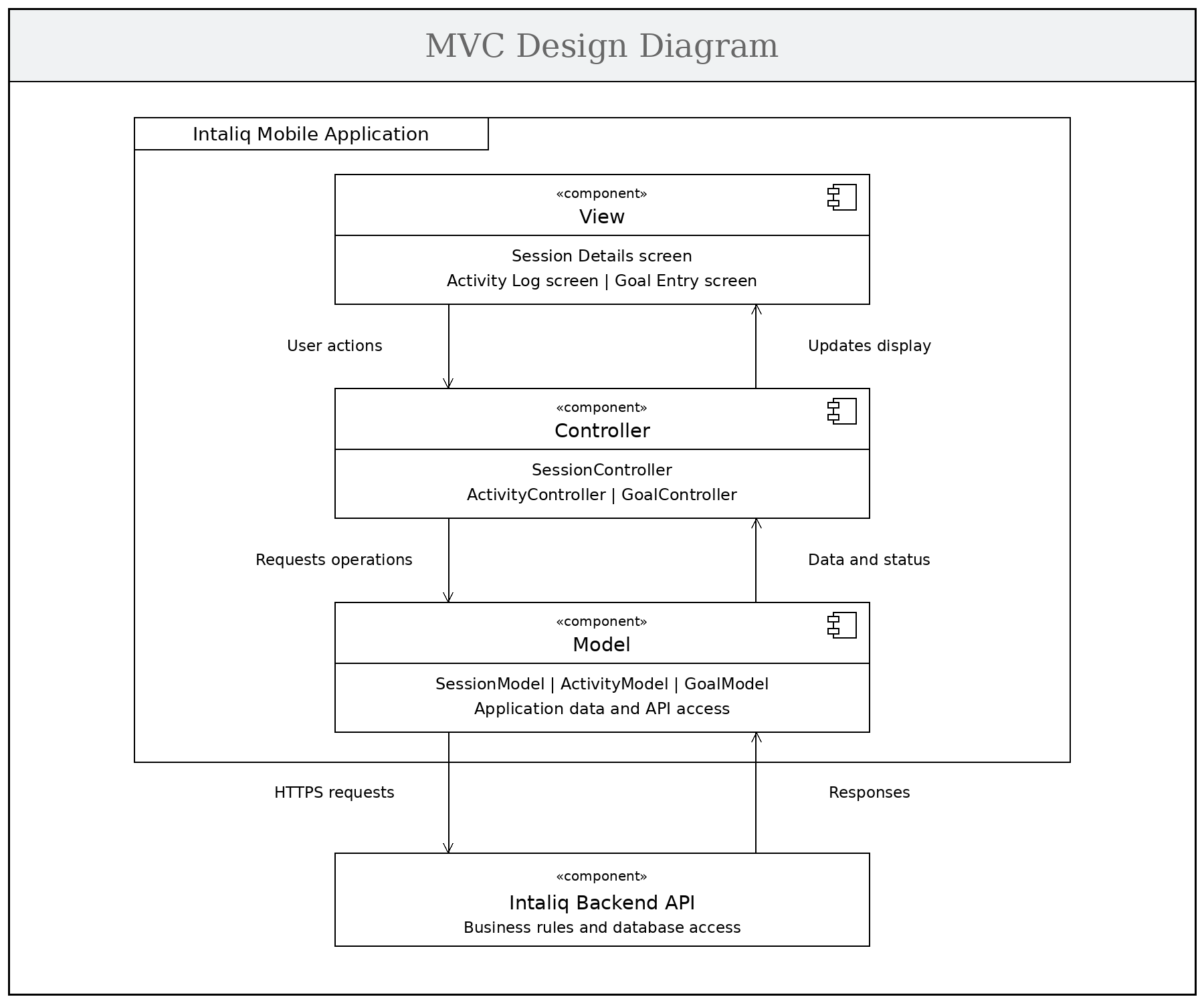
- Model — holds session, activity and goal data and talks to the backend API to read and update it.
- View — shows the screens, collects input, and presents results and error messages.
- Controller — handles actions from the View, works through the Model, and updates the View with the result.
Separating interface, data and control logic makes the app easier to maintain, extend and test. When a user books a session, the View passes the request to the Controller, which calls the backend through the Model and tells the View to show a confirmation or an error.
Layered Architecture Design View
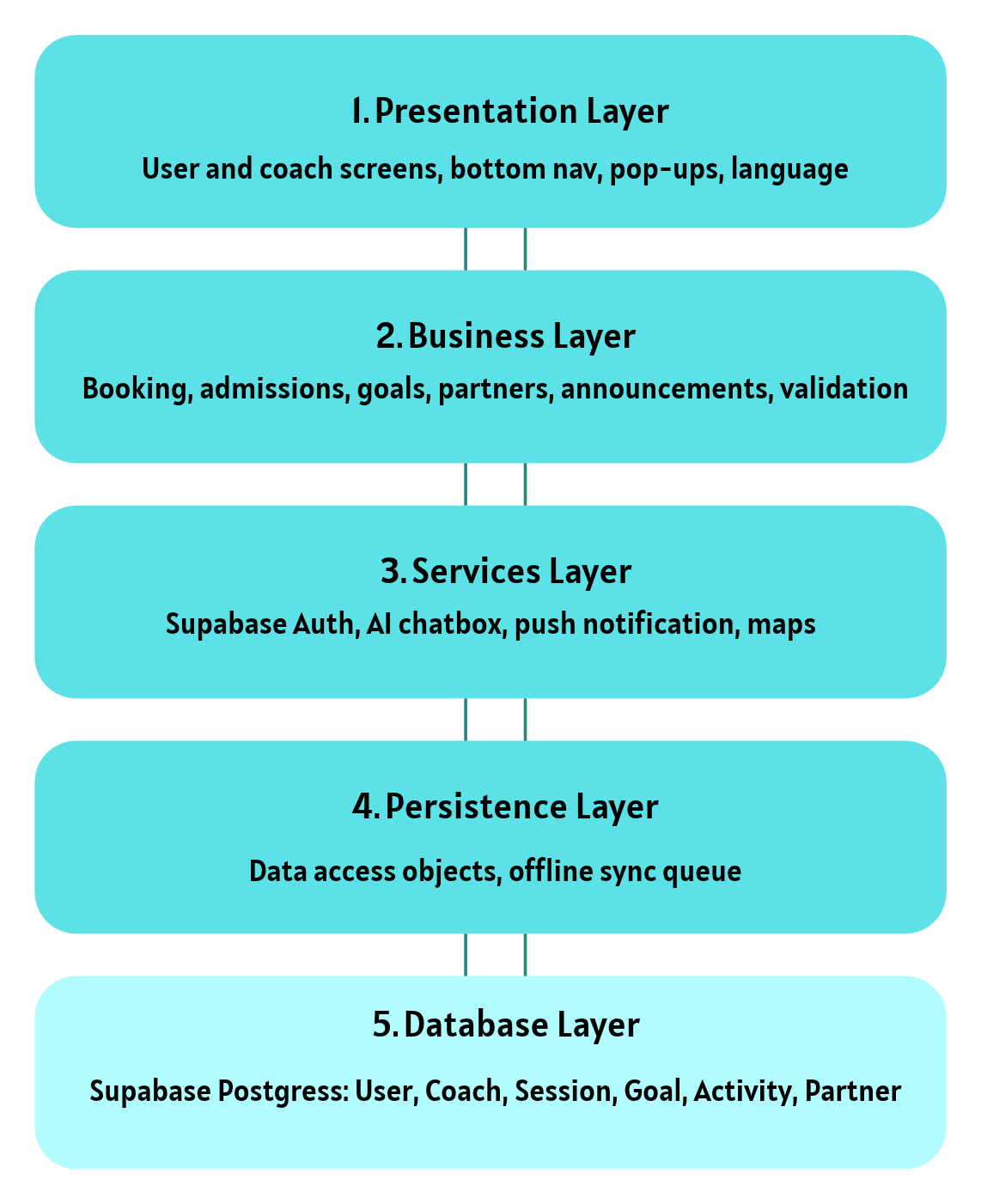
- Presentation · Business · Services · Persistence · Database — each layer only talks to the layer next to it.
A change in one layer does not ripple into the others, and the database can only be reached through the layers above it, which supports security. Each layer can be tested on its own, lower layers are reused by many features, and developers can work on different layers at the same time.