/ARCHITECTURE /USER VIEW
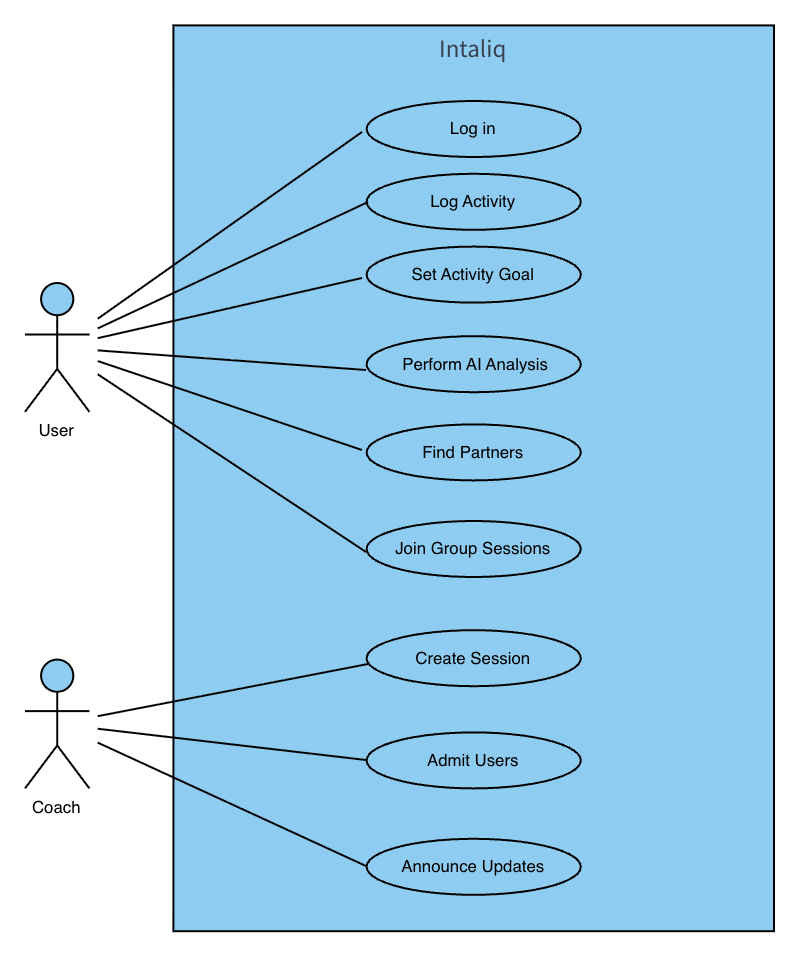
The User View shows Intaliq as its actors see it, organized by the use cases in the SRS. End users track activities, set goals, book sessions, find partners and use the AI chatbox. Fitness coaches create sessions, admit members and post announcements. This (+1) view ties the other four views to these scenarios.
Key Actors
A participant who does outdoor running, cycling or hiking, from beginner to experienced. Logs activities, sets goals, browses and books group sessions, connects and chats with partners, and asks the AI chatbox for fitness advice.
Plans and runs outdoor group sessions. Creates sessions (type, date, time, location, capacity, intensity), reviews and admits join requests, and posts announcements to session members.
External AI service behind the chatbox. Gives goal-setting advice, recovery suggestions, progress analysis and activity recommendations, and never gives medical diagnosis or treatment (SI-2).
External services for push notifications (session reminders, partner updates, announcements, goal reminders) and authentication (email login, verification codes, password reset, 2FA), as in SI-3, SI-4 and CI-3.
Use Case Realizations
UC-01: Book a Group Session
- User logs in and opens the Sessions tab
- Browses available sessions and selects one
- Reviews session and coach details (time, location, capacity, intensity)
- Submits a booking request; system confirms it was sent
- Coach accepts; system adds the user and sends a notification
UC-02: Create a Group Session
- Coach logs in and selects “Create Group Session”
- Enters activity type, date, time, location, capacity and intensity
- Submits; system validates the input (e.g. rejects past dates)
- System saves the session and confirms it is visible to users
UC-03: Admit Session Members
- Coach opens a session’s pending membership requests
- Reviews the user’s request and profile, then selects Accept or Reject
- System checks capacity and fitness-level match, updates the member list and notifies the user